
Copilot App on desktop
Researcher Agenton the Taskbar



How Microsoft 365 Copilot’s first long-running agent found a home in the operating system.
- Duration
- 2 months
- Role
- Product Designer | UX Researcher
- Users
- 2M WAU
- Status
- LIVE in Copilot
The day Copilot stopped answering
questions and started doing work
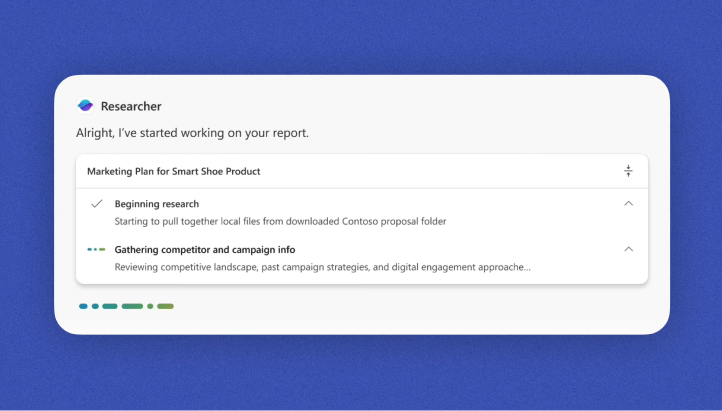
For most of Copilot’s short life, its personality has been reactive.
You typed something, it replied. You spoke, it answered.
The conversation was a ping-pong, and the app window was the whole world.
Then Researcher arrived.
Instead of generating an answer in seconds, could spend 20 or 30 minutes investigating a problem. It could search across organisational knowledge, analyse information, compare sources, and return with a structured report.
For the first time, users weren’t interacting with AI.
They were delegating work to it.
But once users left the Copilot app,
the agent effectively disappeared

(This was a problem)
User Expectations
Imagine asking a colleague to prepare a report. You don't sit beside them for thirty minutes watching them work.
You move on with your day. Occasionally you glance over.
Maybe they need clarification. Maybe they’re finished. Maybe they’re stuck.
The same expectation exists when working with an AI agent.
The Problem
Long-running agent tasks introduced three core problems:
1. Invisibility
Users had no way to track progress once they left the app.
2. Context Switching
Users had to repeatedly return to Copilot to check status.
3. Broken Flow
The system forced attention instead of supporting background work.
designing for confidence, not visibilty
At first glance, the problem sounds simple: Show agent progress on the taskbar. NO. We rephrased the problem.
How do you help users trust work they cannot see?
Showing progress was easy. Building confidence was harder.
Too much visibility would feel distracting. Too little visibility would feel unreliable.
The experience needed to stay present without demanding attention.
Bringing AI to the OS Layer
After mapping dozens of backend states and workflows, we realised everything could be reduced to four moments.
| State | Meaning |
|---|---|
| Running | Task in progress |
| Input Needed | Agent requires user input |
| Completed | Task finished |
| Error | Task failed |
Users didn’t need to understand how Researcher worked. They only needed to know
Is it working? Does it need me? Is it done?
Multi-instance Agentic Experience
What happens when one agent becomes many?
The simplest solution was to create a new taskbar icon for every running Researcher instance.
A user running three or four concurrent research tasks would be introduced a new problem: clutter.
Instead, we chose to treat Researcher as a single destination.
Regardless of how many tasks were running, Researcher maintained a single taskbar presence.
An edge case that changed the design
One design review uncovered a subtle but important flaw. Researcher sometimes asks clarifying questions before beginning its deeper reasoning process.
In those moments, users would often switch away from Copilot assuming work had started. In reality, the agent was waiting for them.
The task had never actually begun.
Without intervention, users could return fifteen minutes later believing the system had stalled. We introduced an additional state.
If Researcher required clarification, it immediately surfaced on the taskbar with a hand-raise indicator.
A tiny detail. But one that dramatically improved trust.
The outcome
At Ignite 2025, Microsoft introduced Agents on the Taskbar.
Researcher became one of the first examples of an AI agent moving beyond the boundaries of a single application and into the operating system itself.
For users, it meant they could finally delegate work and move on with confidence. For me, it represented a shift in how I think about AI design.
Most software is designed around moments when users are paying attention. Agent experiences are different. The most important moments happen when users aren’t looking.
Because when people trust that work is happening without them, that’s when AI begins to feel less like a tool and more like a teammate.
Researcher Agent is used by 2 million people weekly